
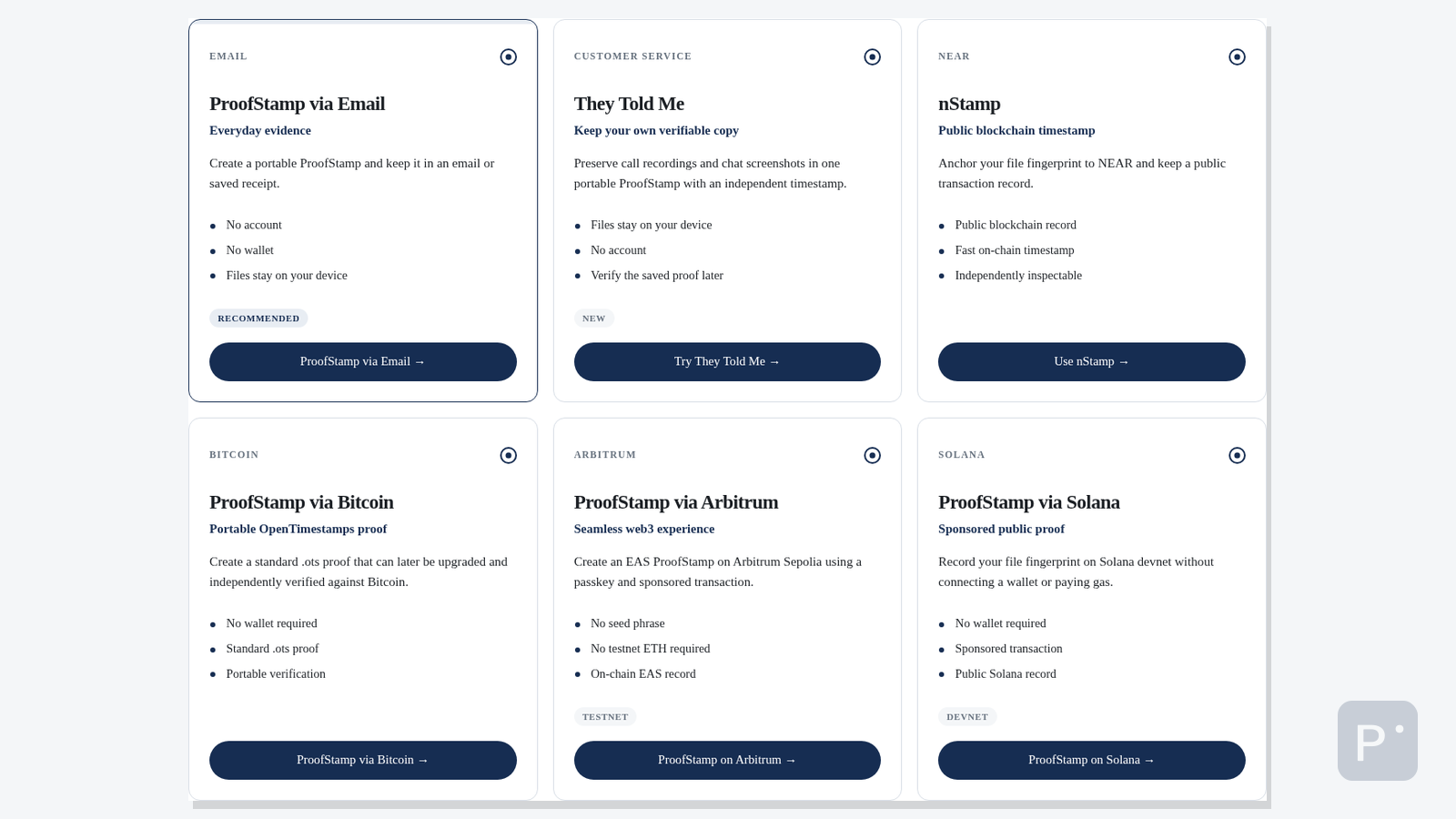
ProofStamp can preserve the fingerprint of a file in several different ways.
The basic idea stays the same:
Your file → SHA-256 fingerprint → evidence
Your original file stays with you. What changes is where the evidence is recorded, how time is established, and how someone can check it later.
Today you can choose between ProofStamp via Email, They Told Me, nStamp, ProofStamp via Bitcoin, ProofStamp via Arbitrum, and ProofStamp via Solana.
There is no single “best” option. Each is useful for a different job.
Start with the simple version
For most everyday situations, ProofStamp via Email is the easiest place to start.
Want to preserve customer-service call recordings, chat screenshots, or related files together? Use They Told Me.
Want a public blockchain timestamp? Look at nStamp.
Want a portable OpenTimestamps proof anchored to Bitcoin? Use ProofStamp via Bitcoin.
Want to explore a passkey-based blockchain workflow? Try the Arbitrum testnet prototype.
Want to see a blockchain ProofStamp with no user wallet at all? Try the Solana devnet prototype.
Here is what changes between them.
ProofStamp via Email
Best for everyday evidence
ProofStamp via Email creates the SHA-256 fingerprint of your file in your browser.
The file is not uploaded to ProofStamp.
You can email the ProofStamp, save it as a text file, or copy it. If you send it by email, the email provider’s received time gives you a separate record of when that ProofStamp reached the inbox.
There is no ProofStamp account and no wallet.
That makes it useful for photos, PDFs, screenshots, submitted forms, work records, and documents you may need to identify later.
If you want a practical example, see How to Prove a Photo or Document Existed Before a Specific Date.
Main advantage: it is simple and familiar.
Main trade-off: the time evidence comes from the email system rather than a public blockchain.
A matching fingerprint shows that the file bytes match. The received email time shows when the ProofStamp reached that inbox.
They Told Me
Best for customer-service records
They Told Me by ProofStamp is designed for records such as customer-service call recordings, chat screenshots, or a mixed set of existing files.
Your files stay on your device while the browser calculates SHA-256 fingerprints and creates a manifest describing the exact files in the package.
The app obtains an independent RFC 3161 timestamp for that manifest and downloads one portable .proofstamp.zip package containing the originals and the proof material needed for later verification.
There is no account, cloud proof history, or remote storage of your original files.
Main advantage: related records can be kept together in one portable package with independent timestamp evidence.
Main trade-off: the timestamp shows that the matching package existed by that timestamp. It does not prove when the conversation actually happened, who participated, whether the record is complete, or whether what was said was true.
nStamp
Best for a fast public blockchain timestamp
nStamp takes the same SHA-256 fingerprint and anchors it to the NEAR blockchain.
Instead of relying on an email record, you get an independently inspectable blockchain record with transaction and block details.
The original file does not need to be published. The public record contains the fingerprint.
Later, someone with the original file can calculate its SHA-256 again and compare it with the fingerprint recorded earlier.
Main advantage: a public blockchain record is available after the transaction confirms.
Main trade-off: it is a blockchain-specific workflow, which is more technical than email.
ProofStamp via Bitcoin
Best for a portable Bitcoin-backed timestamp
ProofStamp via Bitcoin uses OpenTimestamps.
The browser hashes your file locally and creates a standard .ots proof tied directly to that file’s SHA-256 fingerprint.
You keep the proof.
That portability is important. A completed proof is designed to remain independently verifiable even if ProofStamp.org is no longer available. Standard OpenTimestamps tools can verify it.
Bitcoin anchoring takes time
A newly created timestamp is not immediately Bitcoin-verified.
It starts in a Waiting for Bitcoin state.
You save the receipt and check again later. Once the Bitcoin attestation is available, the proof can support a narrow claim:
The matching file fingerprint existed no later than the verified Bitcoin anchoring block.
It does not turn the Bitcoin block time into the file’s original creation time.
Main advantage: a portable, open proof with a strong independent verification path.
Main trade-off: final Bitcoin anchoring is asynchronous.
Experimental
ProofStamp via Arbitrum
Best for exploring a passkey-based blockchain workflow
ProofStamp via Arbitrum explores a different approach.
The browser calculates the file’s SHA-256 locally and records the fingerprint as an Ethereum Attestation Service record on Arbitrum Sepolia.
The prototype uses passkeys instead of seed phrases and can sponsor the blockchain transaction, so a normal test user does not need to acquire testnet ETH first.
After the transaction, the application reads the attestation back from Arbitrum and checks it before reporting success.
This is useful because it demonstrates what a blockchain ProofStamp could feel like when the blockchain mechanics are pushed into the background.
But the status matters.
This is an Arbitrum Sepolia testnet reference implementation, not a production evidence service.
Main advantage: passkeys, sponsored transactions, and direct on-chain attestations make the workflow feel closer to a normal web app.
Main trade-off: testnet only.
Testnet prototype
ProofStamp via Solana
Best for exploring a walletless sponsored blockchain workflow
ProofStamp via Solana takes another approach to hiding blockchain complexity.
Your browser calculates the file’s SHA-256 locally. The file itself is not submitted by the application.
A small sponsor service records the fingerprint in a Solana Memo transaction on devnet. The user does not need to connect a wallet, manage a seed phrase, hold tokens, or pay the transaction fee.
After the transaction finalizes, the application reads the public transaction back and checks that the fingerprint recorded on Solana is the one it intended to submit.
Later, the original file can be hashed again and checked against the public Solana transaction.
Unlike the Arbitrum prototype, there is no passkey or user blockchain account in this version. The sponsor service handles the transaction.
But this is still a prototype.
This version runs on Solana devnet. Devnet can reset, and historical transaction data may not remain available indefinitely. It should not be treated as permanent or legal evidence.
Solana’s reported block time is network time associated with the transaction. It is not the file’s original creation time.
Main advantage: a public blockchain proof without requiring the user to have a wallet, tokens, or blockchain account.
Main trade-off: devnet only, with no permanence guarantee.
Devnet prototype
The six options side by side
| They Told Me | nStamp | Bitcoin | Arbitrum | Solana | ||
|---|---|---|---|---|---|---|
| Good fit | Everyday evidence | Customer-service records | Fast public timestamp | Portable long-term timestamp | Passkey-based blockchain UX | Walletless sponsored blockchain UX |
| Original file uploaded by ProofStamp | No | No | No | No | No | No |
| Time evidence | Email received time when sent | RFC 3161 timestamp | NEAR block record | Bitcoin anchoring block | Arbitrum Sepolia block | Solana-reported devnet block time |
| Public blockchain | No | No | NEAR | Bitcoin | Arbitrum Sepolia testnet | Solana devnet |
| What you keep | Plain-text ProofStamp | .proofstamp.zip package | Transaction / proof record | Receipt + standard .ots | Receipt + EAS Proof ID | Receipt + transaction signature |
| Independent check | Recalculate SHA-256 | Verify package and RFC 3161 proof | Inspect public record | OpenTimestamps tools | Read EAS from Arbitrum | Inspect public Solana transaction |
| Current status | Ready to use | Live app | Ready to use | Ready to use | Testnet prototype | Devnet prototype |
Which one is stronger?
It depends on what you need.
Imagine a contractor takes photos before starting work on someone’s property.
The important thing may simply be to create a record immediately and keep a copy in an inbox. Email ProofStamp is a good fit. That is the same idea behind Before You Leave the Job, ProofStamp the Photo.
If the evidence is a customer-service call recording, chat screenshot, or several related files you want to keep together, They Told Me creates one portable package with independent RFC 3161 timestamp evidence.
Now imagine a document where a public timestamp matters. nStamp gives you a public blockchain record.
If you care more about keeping a standardized timestamp proof that can be verified independently years later, the Bitcoin and OpenTimestamps path has different advantages.
If you are building a product and want to explore passkeys, sponsored transactions, and on-chain attestations, the Arbitrum prototype is the more relevant experiment.
If you want to see how a public blockchain ProofStamp can work without giving the user a wallet at all, the Solana prototype demonstrates that model.
The method should follow the job.
What all six start with
They all depend on the same basic tool: SHA-256.
SHA-256 turns the exact bytes of a file into a fixed-length digital fingerprint.
Give it the same bytes again and you get the same fingerprint.
Change even one byte and the fingerprint changes.
That lets you answer a useful question later:
Is this the same digital file that was recorded before?
If you want to understand the mechanism, read What Is a Hash Function? SHA-256 Explained.
What none of these methods proves
A timestamped fingerprint is evidence about a particular digital state.
- It does not automatically prove that the contents are true.
- It does not prove who created or owns the file.
- It does not prove when the file was originally created.
- It does not prove where a photo was taken.
- It does not prove that the file was never edited before it was stamped.
A false document can be stamped too.
That is why ProofStamp keeps the claim narrow: evidence of existence and integrity, not proof of truth.
Same fingerprint. Different proof.
Email favors simplicity.
They Told Me keeps related customer-service records together in a portable timestamped package.
nStamp gives you a fast public blockchain record.
Bitcoin and OpenTimestamps favor portability and independent verification.
Arbitrum explores a passkey-based blockchain experience with sponsored transactions.
Solana explores a walletless blockchain experience where the transaction is sponsored for the user.
You do not need to choose based on which technology sounds more impressive.
Choose based on the evidence you need.
Try ProofStamp
Choose the method that fits the job.
If you are looking at ProofStamp for approvals, inspections, handoffs, audit trails, or other company workflows, see ProofStamp for Business.