
AI is becoming part of ordinary legal work.
A lawyer may use it to research a question, summarize documents, test an argument, organize information, or prepare a first draft.
Most AI conversations do not need to be preserved forever.
But some do.
If AI-assisted work is questioned months later, reconstructing exactly what happened from memory can be difficult.
A better question is:
What record would you want to have if this AI-assisted work were questioned later?
Keep the conversations that matter
You do not need to ProofStamp every AI chat.
The useful ones are conversations connected to important research, decisions, analysis, claims, drafts, or work that someone may later ask you to explain.
Imagine a lawyer uses AI to research an unfamiliar issue. The AI suggests several authorities and a possible argument. The lawyer checks the authorities independently, rejects one suggestion, and uses part of the research in a memorandum.
Six months later, someone asks how that research was performed.
A screenshot of one AI answer is not a very good record.
The conversation itself provides much more context.
What should the record contain?
A useful AI record can preserve the conversation content that was available to the AI environment, the sources that were actually consulted, available session information, known omissions, and a statement about how much of the conversation could actually be confirmed.
The important phrase is actually available.
ProofStamp does not ask the AI to invent missing timestamps, hidden instructions, private reasoning, session metadata, or parts of the conversation it cannot access.
If something is unavailable, the record should say so.
That is better than creating a record that only looks complete because gaps were silently filled.
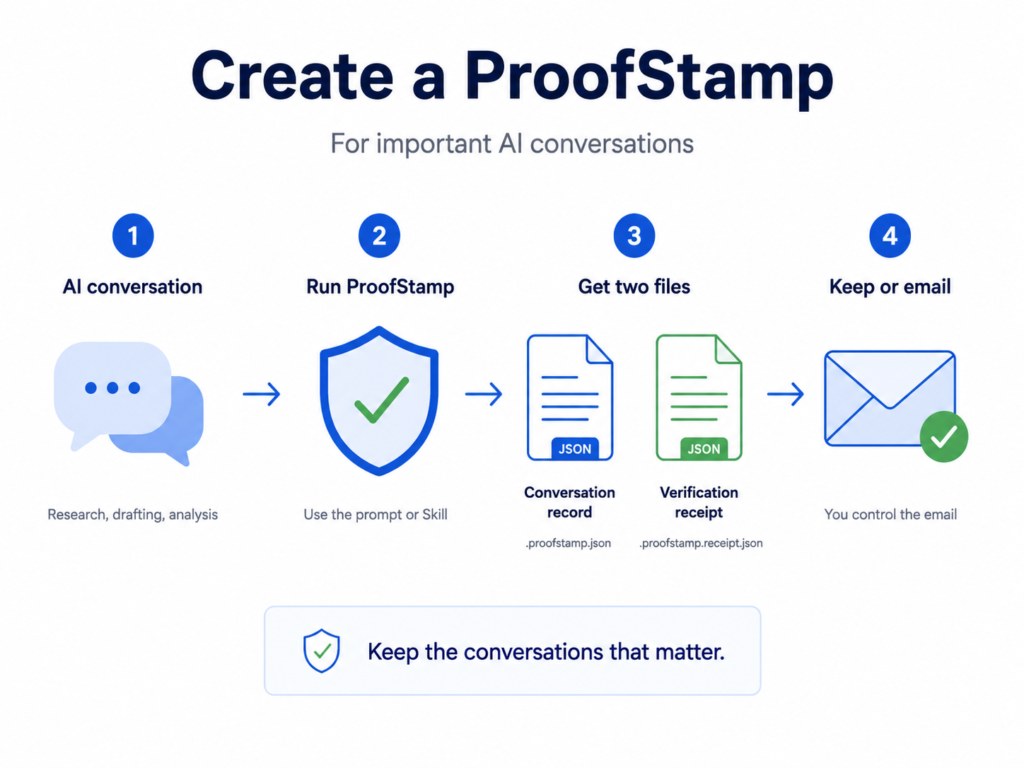
ProofStamp the AI session
ProofStamp for AI is an open workflow for preserving important AI conversations.
You can use the public prompt or install the ProofStamp Skill. The instructions are published openly so you can read what ProofStamp asks the AI to do before using it.
If the Skill is installed, the command is simple:
ProofStamp this session.A successful ProofStamp creates two files:
Conversation record*.proofstamp.json
Verification receipt*.proofstamp.receipt.json
The receipt records the filename, exact byte size, SHA-256 fingerprint, and verification result.
Conversation coverage matters
There is an important distinction between preserving a file perfectly and proving that the file contains every part of the original conversation.
An AI may be able to record everything it currently sees. That does not necessarily prove that it was shown every message that ever existed in the session.
ProofStamp therefore records conversation coverage separately from file integrity.
For a normal AI-generated capture, coverage may be reported as not independently confirmed. If known material is missing, it can be reported as partial.
This distinction matters in legal work.
A perfectly preserved incomplete record is still incomplete.
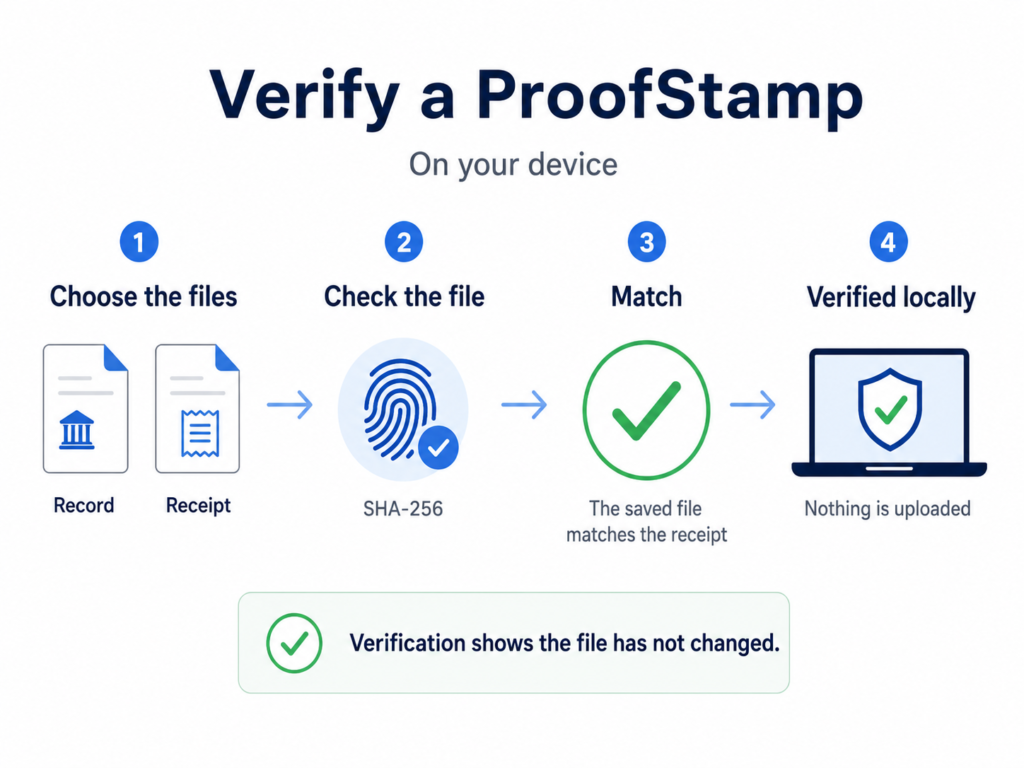
What SHA-256 can prove
SHA-256 creates a fingerprint of the exact saved file.
Change even a small part of the file and its fingerprint changes.
If the ProofStamp file later produces the same SHA-256 recorded in its receipt, we can make a narrow but useful statement:
The file being checked now matches the exact bytes that were fingerprinted.
That is an integrity claim.
It is not a truth claim.
What it cannot prove
A matching ProofStamp does not prove that the AI’s legal analysis was correct.
It does not prove that every part of the original conversation was captured.
It does not prove that ChatGPT, Claude, or another AI provider authenticated the record.
It does not prove who typed every message.
And it does not prove when the underlying AI conversation originally happened.
Those are different claims that require different evidence.
This boundary is deliberate. Proof is more useful when the claim is precise.
What about time?
After a ProofStamp is created and verified, the workflow can prepare an Email this ProofStamp link.
The email contains the filename, SHA-256 fingerprint, byte size, verification status, and conversation coverage. The user chooses the recipient and sends it. Nothing is sent automatically.
The received email can provide external evidence that the fingerprint existed no later than the time the email was received.
But the email does not prove that the underlying AI conversation happened at that time.
The timestamp applies to the fingerprint.
The lawyer still owns the judgment
ProofStamp does not decide whether an authority is real.
It does not determine whether an argument is legally sound.
It does not replace professional review.
Its job is simpler:
Preserve a better record of important AI-assisted work so that the record can be checked later.
A simple rule
You do not need to ProofStamp every AI conversation.
ProofStamp the ones you may need to explain later.
The result is not proof that the AI was right.
It is evidence of what was preserved, what the record contains, what its limits are, and whether that exact saved record has changed.
That is a more useful foundation for accountable AI-assisted work.
ProofStamp is an integrity and evidence tool. It does not certify that an AI conversation is accurate, complete, provider-authenticated, or legally admissible.